TL;DR - Someone found a Wi-Fi-enabled hidden camera inside a hotel room power adapter this week, streaming footage to an overseas server. The hardware costs under fifty dollars and is sold openly. The good news: a four-minute sweep on check-in catches almost all of it. Two scans with your eyes (line-of-sight and unexpected electronics), one scan with your phone's front camera in a dark room (IR LED detection), and a quick check of the room's Wi-Fi for unfamiliar devices. Below: the full sweep, what to do if you find something, and the boring travel hygiene that prevents the problem upstream.
I check the smoke detector first now.
Two stories crossed my feed this week that share an uncomfortable thread for anyone who travels. The first: a guest at a hotel found a Wi-Fi-enabled camera concealed inside a power adapter in their room, transmitting live footage to a server most likely based overseas. The hotel denied involvement. There was no CCTV. The post hit 447 upvotes and 143 comments, most of them asking the same two questions: how would I even spot that, and what do I do if I find one?
The second story: a Bluetooth tracker hidden inside a postcard was mailed to a Dutch warship and exposed the vessel's location for 24 hours before anyone noticed. Five dollars of hardware, a $585 million ship.
Different stories, same underline: surveillance hardware is now cheap, easy to hide, and you almost always have no idea it's there. This post is about hotel rooms specifically, because that is where most readers will encounter the threat first, and because it is where you have the most ability to actually do something about it.
Honest answer up front: a 4-minute sweep at check-in catches the vast majority of devices that are likely to be in a hotel room. It will not catch every possible setup, but it will catch the common ones, and the common ones are the ones you are most likely to actually run into.
What the hotel camera actually looked like
The viral post had a photo. The device was a generic-looking USB power adapter, the kind hotels leave on the bedside table for guests who forgot a charger. Inside the housing was a small camera lens behind a pinhole, a Wi-Fi module, and a small battery. It looked like a power adapter. It was a power adapter, technically. It also recorded the room.
These devices are not custom builds. They are sold openly on overseas marketplaces for between $30 and $80, often advertised as "nanny cams" or "discreet home security". The buyer does not need to be technical. The setup is two taps in a phone app.
Common host objects for this style of camera include:
- Power adapters and USB chargers (the most common, because they need to be plugged in anyway and nobody questions an extra charger)
- Smoke detectors (high vantage point, line of sight to the bed)
- Alarm clocks and clock radios (next to the bed, plugged in, with natural reasons to have a small lens-looking dot on the front)
- Air fresheners and tissue boxes (battery-operated, easily moved)
- Picture frames (mounted, line of sight, lens hides behind the frame)
- Wireless routers and access points (an extra one in the room is a major red flag)
- Mirrors (two-way mirrors are rare in hotels but searchable; the fingernail test below covers this)
If you remember nothing else from this post, remember this: anything plugged in that you didn't bring, in line of sight of the bed or shower, deserves ten seconds of scrutiny.
Why this is happening more, not less
A few things came together to make the cost of surveilling a stranger collapse:
The hardware got cheap. Wi-Fi camera modules cost under $10 wholesale. Battery and storage components dropped with smartphone scale.
Distribution went global. Marketplaces in regions with weak surveillance-device laws ship anywhere with two-day delivery.
Streaming infrastructure is free. A $30 camera can stream to a free cloud account that the buyer monitors from anywhere in the world. No physical retrieval needed.
Detection lags adoption. Hotel staff are not trained to find these devices. Cleaning crews replace power adapters without inspecting them. Most hotels have no policy beyond "report it if you notice".
The combined effect is that planting a camera in a short-stay rental, an Airbnb, or a hotel room is now a low-cost low-risk move for anyone with bad intentions. The detection burden falls on you, the guest. That is the uncomfortable part of this post.
The 4-minute hotel room sweep
Do this on check-in, before unpacking. It saves you from doing it later, panicked, after you noticed something.
1. The 60-second eye scan
Stand at the foot of the bed and look at everything in line of sight. Smoke detector. Air-conditioning vent. Picture frame. Alarm clock. The TV. The mirror over the desk. You are looking for one thing: a small dark dot or pinhole that sits where a lens could see the bed.
Then turn 90 degrees. Repeat for the bathroom (especially the shower line). Repeat for any sitting area.
2. The 90-second plugged-in audit
Walk the room and look at every plug. Anything plugged in that you did not bring, and that is not obviously decorative or functional, gets flipped over and inspected.
USB power bricks and adapters in particular: pick them up, look at them, look at the back. If you see a pinhole or a small lens-shaped opening, unplug it and put it in a drawer (do not throw it away, you may need it for evidence).
The clock radio especially. The clock radio is the single most common host for hidden cameras in hotel rooms.
3. The 60-second IR check
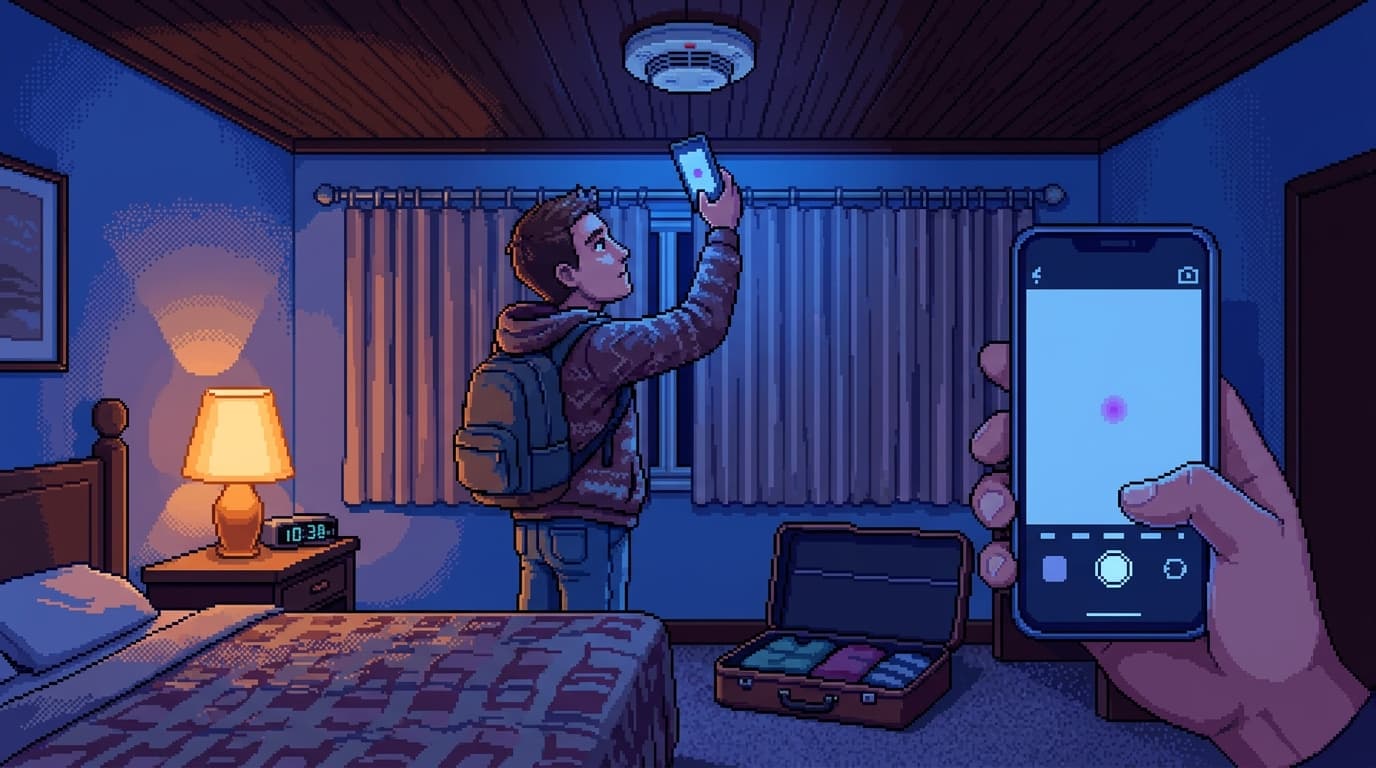
Most modern hidden cameras use infrared (IR) LEDs to record in low light. IR is invisible to your naked eye but visible to most phone front cameras (selfie cameras have weaker IR filters than rear cameras, which is what you want here).
- Turn the lights off.
- Open your phone camera in selfie mode.
- Slowly sweep the room through the phone screen.
- Any active IR camera will show as small purple or white dots on the screen even though you can't see them with your eyes.
This works on phones from roughly 2018 onwards. If your phone is older, the rear camera also works on most models, but rear cameras have stronger IR filters and the dots will be fainter.
4. The 30-second Wi-Fi check
If you are connected to the hotel Wi-Fi anyway, run a free network scanner like Fing or Net Analyzer. You are looking for devices on the network that are not yours and are not obviously hotel infrastructure (printers, chromecasts, smart TVs).
Unfamiliar device names like "ESP32", "Tuya", "Xiaomi camera", or anything generic with "cam" or "view" in the name is worth photographing and following up.
This step is optional and gets less reliable on guest networks where every device is isolated, but on smaller hotels and Airbnb-style stays the network is often flat and you can see everything.
Bonus: the fingernail mirror test
Quick aside on two-way mirrors, which are rare in hotels but worth the 5-second check.
Touch the tip of your fingernail to the surface of any mirror in the room. If there is a visible gap between your real fingernail and the reflection (you can see through to the back), the mirror is normal. If your fingernail and the reflection appear to touch directly with no gap, you are looking through a two-way mirror and the surface you are touching is glass with a one-way coating.
If a mirror fails the fingernail test, do not stay in that room. This is a more serious red flag than a single hidden camera.
What to actually do if you find one
You found something. Do not panic. Do not rip it apart. Do not post about it on social media yet.
Photograph it in place. Wide shot showing the room context, then close-ups. Serial numbers if visible. The brand of the host object (the power adapter, the clock).
Unplug or disable it. If it is a powered device, unplug it. If it is battery-powered, cover the lens with a strip of tape or fabric and set it aside. You want to stop the recording without destroying the evidence.
Call the hotel front desk and request a manager. Not housekeeping. Not the night clerk. A duty manager. Tell them you have found a covert recording device in your room and you are not going to clean up after them. Ask for a different room (or a different hotel; you do not have to stay).
Report it to local police if the country has a relevant statute. In Australia, covert recording in a private residential setting is a criminal offence in most states. In the EU, similar protections exist. In the US, the legal framework varies by state but most have a private-recording statute. If the hotel pushes back, the report file is your leverage.
Tell the booking platform. If you booked through Airbnb, Booking, or similar, file a report through their trust and safety channel. Platforms have a stronger incentive to act than individual hotels do.
Then post about it if you want to. Do this last, not first. Posting first can compromise the evidence chain and tip off the operator that they have been caught.
Travel hygiene that prevents the problem upstream
The 4-minute sweep is for the room you have just checked into. There are three things you can do before you book that reduce the chance of needing it.
Read the recent reviews. Especially recent reviews on independent sites, not just the booking platform. Search the property name plus "camera" or "hidden". One previous report is worth more than ten clean reviews.
Prefer larger chains for high-stakes trips. Major hotel chains have legal exposure for incidents and are less likely to ignore a credible camera report. Airbnb-style short stays have wider variance: some are great, some are owned by people who barely interact with the platform.
Travel with a small roll of dark electrical tape and a small piece of fabric. These are the two best low-effort lens covers in existence. If you are unsure about a device but cannot remove it (some smoke detectors are wired in), cover the lens. The image goes black. The device is rendered useless without you having to dismantle anything.
The mental shift
The hardest part of this is not the sweep itself. It is the moment of doing it the first time and feeling like you are being paranoid.
You are not being paranoid. You are doing what hotel staff used to do, before the cameras got cheap and the staff stopped being trained for it. The four-minute scan is no different from the lock-the-door check. It feels strange the first time and after that it is just a thing you do.
If you only take one habit from this post, take the IR check in the dark. It is the highest-yield 60 seconds of your travel routine, it works on any phone you already own, and it catches the device class (powered IR-active cameras) that almost all hotel-room hidden cameras fall into.
FAQ
Are hidden cameras in hotel rooms actually common, or is this overblown?
It is hard to know exactly how common because most are never found. The cases we hear about are the ones discovered. Surveys of short-stay rentals run by privacy researchers (Vrbo, Airbnb, smaller chains) find devices in single-digit percentages of rooms, which sounds low until you do the maths on how many rooms are stayed in each year. The expected value of doing a four-minute sweep is high, especially for trips that are sensitive (work travel, family travel, anywhere your image being recorded would matter).
What if I find one but I'm not sure it's a camera?
If it has a small dark dot or a pinhole that sits in line of sight of the bed, treat it as a camera until proved otherwise. Cover the lens with tape, set it aside, and tell the front desk. Worst case, you've caused a minor inconvenience to housekeeping. Best case, you've stopped active recording.
Can hotels legally have cameras in private rooms?
In Australia, the EU, the UK, Canada, and most US states, cameras in private hotel rooms are a serious legal problem for the property and may be a criminal offence depending on jurisdiction. Cameras in lobbies, hallways, parking, and other public areas are normal and legal. The line is "reasonable expectation of privacy".
What about the bathroom specifically?
The bathroom is the highest-risk room and the place to do the IR sweep first. Hidden cameras in bathrooms are vastly more often unlawful and vastly more often used for criminal purposes than cameras elsewhere. Spend the extra 30 seconds.
Will my phone find every camera, or are there ones it can't see?
Your phone catches IR-active cameras (the most common). It will miss cameras that are recording in pure visible light during the day, cameras that are off when you sweep, and cameras that have their IR LEDs disabled. The eye scan plus the plugged-in audit catch most of the rest.
Is using tape over the lens enough, or should I unplug it entirely?
Unplug it if you can. Tape the lens if you can't. The reason to unplug is that some devices have microphones too, and tape over the lens does nothing to the audio. If unplugging is not possible (smoke detector wired into mains), tape the lens AND wrap the device or move objects to block the microphone.
What about Bluetooth trackers like the one in the warship story?
Bluetooth trackers are a different threat model: they're for location, not visual or audio surveillance. The free app Tracker Detect (Apple devices, scans for AirTag-class trackers) and the built-in Find My Device options on Android handle most of these. Run that scan on your luggage every few days during long trips.
If this was useful, the Secure In Seconds newsletter covers one specific story like this every Thursday. Practical, calm, no fear-mongering. Just the thing to do this week.
Stay safe out there.